Panda Master APK Download for Android – Safe Installation Guide
Jeffrey Danielson

Content table
- How to Download Panda Master APK on Android (Official Method)
- Step-by-Step Panda Master Installation Guide
- How to Update Panda Master APK on Android
- Panda Master APK Download Troubleshooting
- Panda Master APK Security & Safety Checklist
- System Requirements & Device Compatibility
- Play With Awareness
- Frequently Asked Questions
Panda Master isn't on Google Play. That means a Panda Master APK download only works if you get the file from the right place, and VegasGems is that place. Install the app manually, then log in with your account to access over 28 games, including fish games, slots, and blackjack. This guide covers installation, what to expect, and how to fix common issues.
How to Download Panda Master APK on Android (Official Method)

When you download the Panda Master APK from VegasGems, you’re using the official channel, not a third-party site. Unofficial sources carry real risks like outdated versions or unwanted software. VegasGems is the safer choice.
Panda Master isn’t on Google Play because their rules don’t allow social gaming apps with virtual prize redemption, which includes Panda Master. This applies to all similar apps, so downloading the APK from VegasGems is the approved method.
Learn more about the available games, platform features, and more at Panda Master on VegasGems.
Download Requirements & Compatibility
- Android 5.0 (Lollipop) or later (check under Settings → About Phone → Android Version)
- Minimum 2GB RAM (3GB+ recommended for shooter game sessions)
- At least 150MB free internal storage (400MB recommended with full assets)
- Stable Wi-Fi connection, which reduces the risk of corrupted downloads from mobile data interruptions
Step-by-Step Panda Master Installation Guide
Here is how to download Panda Master on Android. Follow these three steps: enable the right settings, install the file, and log in. With a good connection, it takes less than five minutes. The APK will appear in your Downloads folder when the download finishes.
Enable Unknown Sources (Security Settings)
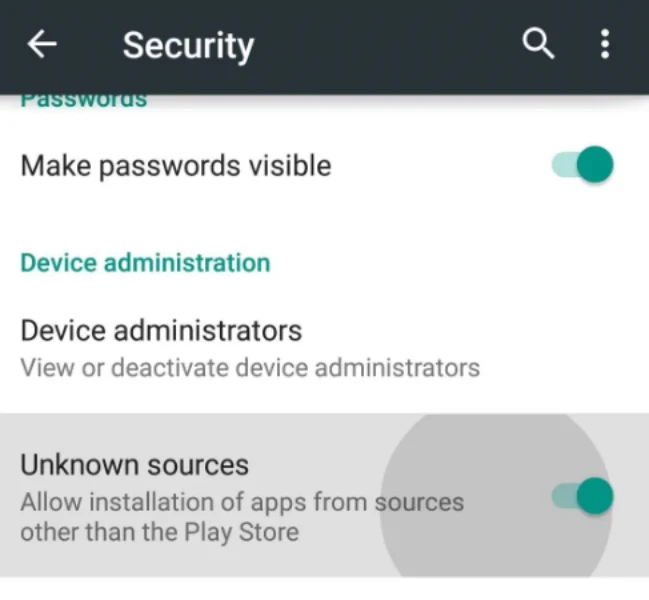
Android 8.0+: Settings → Apps & Notifications → Special App Access → Install Unknown Apps → select the download browser → toggle Allow from this source on. Android 7.1 and below: Settings → Security → Unknown Sources → toggle on.
This setup takes about 30 seconds, and you only need to do it once. After installing Panda Master, go back and turn this setting off for your browser.
Installing the APK File

- Open the file manager and navigate to the Downloads folder, or tap the browser notification directly
- Tap the Panda Master APK to open the Android package installer prompt
- Review the permissions list (storage, internet, and notifications expected) and tap Install
- Wait 30 to 60 seconds for installation to complete, then tap Open
- Grant storage and network permissions on first launch when prompted
First Launch & Account Setup
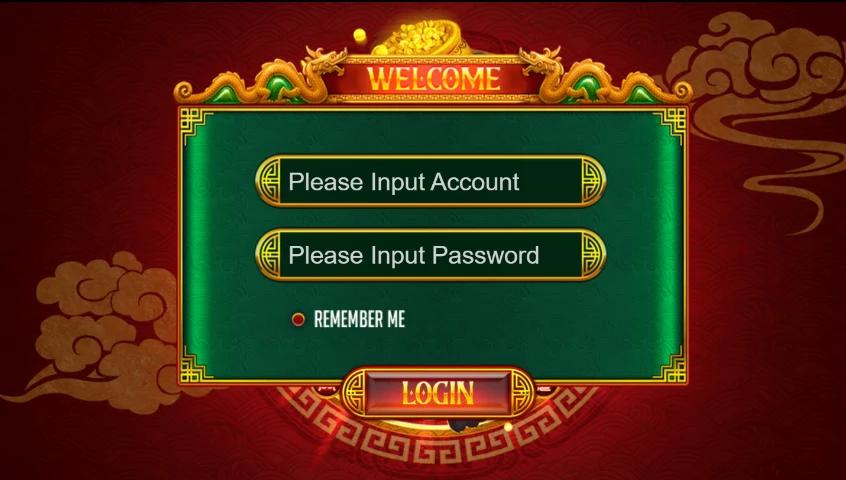
When you first open Panda Master, you’ll see a login screen. Use your login credentials that were sent by VegasGems to access all 28 games right away, like Age of Cleopatra, Double Wheels, Fortune Jungle, Golden Poker, and Old Miner. Your account balance and progress are saved online.
New players can create their VegasGems account before installing, so login is immediate on first launch.
Once you're in, you can deposit to play and unlock full access to Panda Master's games. A minimum $10 deposit is what actually funds a play session.
How to Update Panda Master APK on Android
Because Panda Master is sideloaded, installing the latest Panda Master APK version doesn't happen automatically. You download Panda Master manually for each update, since there is no Play Store notification or background download.
It’s recommended that new players use the current version, which has all the latest security updates and games. Only use an older version if the current one crashes on your device. If that happens, contact VegasGems support for help.
Manual Update Process
Go to Settings, then Apps, and find Panda Master to check your version. Compare it with the version on the VegasGems page. If there’s a newer one, download and install it over your current app. Your account data will usually stay safe during updates.
Your VegasGems account, balance, and game progress are saved online, not on your device. Reinstalling or updating Panda Master won’t affect them. Just log in again after reinstalling to get full access.
Panda Master APK Download Troubleshooting

Most Panda Master app not installing fix situations fall into three categories: a stalled download, a blocked install, or a crash after install.
Download Failed or Stuck
- Switch from mobile data to Wi-Fi; this is the most common cause of stalled downloads
- Clear browser cache (Settings → Apps → Browser → Storage → Clear Cache), then retry
- Try a different browser if the stall repeats on the same network
APK Won't Install
- Confirm Unknown Sources is enabled for the browser you're using
- Free at least 300MB of storage before retrying
- Uninstall any existing Panda Master version first, since conflicting signatures cause this error on over-install attempts
App Crashes After Install
- Clear app cache (Settings → Apps → Panda Master → Storage → Clear Cache), then relaunch
- Confirm your device meets Android 5.0+ and 2GB+ RAM
- If it still crashes, uninstall completely, restart the device, and reinstall
If you see a parse error, it usually means the file didn’t download completely or is corrupted. Delete it from your Downloads, clear your browser cache, and try downloading again using a stable Wi-Fi connection.
If none of the above resolves the issue, contact the VegasGems support team with your device model, Android version, and a description of the error.
Panda Master APK Security & Safety Checklist

Before opening any Panda Master APK download file, run through this checklist. These checks apply to any source, not only third-party sites. Every Panda Master APK from VegasGems meets these requirements before release.
- File size after download matches the figure listed on the VegasGems page (a discrepancy of more than a few KB signals modification or an incomplete download)
- Publisher name during install matches the developer listed on the VegasGems download page
- Re-disable Unknown Sources for the browser immediately after install
- Run a Google Play Protect scan after installation
- Any site requiring a survey or account creation before releasing the download link, or advertising 'unlimited credits,' is a red flag to avoid
That's the short answer to the “is the Panda Master APK safe to download?” question. As long as it comes from VegasGems and passes every item on this checklist, it is safe. It's a different question from is Panda Master legit as a platform overall, but if you're new here, that's worth checking too.
For VegasGems player protection resources, visit responsible gaming at VegasGems.
System Requirements & Device Compatibility
The Panda Master APK latest version runs on Android 5.0 and above with modest hardware needs.
|
Requirement |
Minimum |
Recommended |
| Android Version | 5.0 (Lollipop) | 8.0+ |
| RAM | 2GB | 3GB+ |
| Free Storage | 150MB | 400MB |
| Connection | Mobile data | Wi-Fi for download |
Tablets running Android 5.0+ install identically to smartphones, with the interface scaling to larger displays automatically. You can check for Panda Master bonus after installing the app, so you don't start playing without knowing what's available.
Play With Awareness
Pay attention to how gaming makes you feel. If you stop playing when you planned, it’s a good sign you’re enjoying it as entertainment. If you keep playing because it’s hard to stop, that’s something to be aware of. Support is available if gaming starts to feel less optional. This content is not legal advice.
Frequently Asked Questions
How do I download Panda Master APK on Android safely?
Enable "Install from Unknown Sources" in your browser's Android settings, tap the download button on the VegasGems Panda Master page, and install from the Downloads folder. Verify the file size matches the VegasGems listing before opening.
Why is the Panda Master APK not installing on my phone?
Most common causes are Unknown Sources not enabled for the download browser, insufficient storage, or a corrupted download. Enable Unknown Sources, free up storage space, and re-download from VegasGems on Wi-Fi.
How do I update Panda Master to the latest version?
Check Settings → Apps → Panda Master → App Info for the installed version, then compare it against the current version on the VegasGems Panda Master page. Download the new APK and install it directly over the existing app.
Is downloading Panda Master APK from VegasGems safe?
Yes. VegasGems sources each Panda Master APK to match the current official build before publishing. Confirm the file size matches the listing, check that permissions are limited to storage, network, and notifications, and run a Play Protect scan after install.
Does Panda Master work on iPhone?
Not as a downloadable app. iPhone access works through the browser instead, and VegasGems has a dedicated guide for that path.
Can I download Panda Master 777 APK on an Android tablet?
Yes, the APK installs identically on Android tablets running 5.0+. Performance depends on the tablet's processor and RAM, with 3GB+ RAM tablets delivering the best experience across online slot games as well as fish arcade options.
Categories