How to Download Orion Stars 777 APK via VegasGems | Safe Install Guide
Jeffrey Danielson

Content table
Hunting for a safe link to download Orion Stars 777 APK files can be exhausting and stressful. Fake apps unfortunately exist, and they might be carrying hidden malware that can harm your device.
To relieve your stress, we’ve created a guide to download Orion Stars to your Androivd device safely. VegasGems is the official safe way to download the Orion Stars app, so you don’t need to worry about modded apps. Our safety-first guide will break down everything you need to know to run the popular social gaming platform on your mobile phone.
Before You Download: Safety Checklist
When looking for a way to download Orion Stars 777 APK, players have a genuine concern. Many wonder whether this APK is safe when browsing search results that feature many shady mirror sites. We’re here to address those concerns. VegasGems is an official safe route to the Orion Stars 777 APK, providing players with a safe username and password and a clean link to the platform.
So, is the Orion Stars 777 APK safe to download? The answer is yes, as long as you go through VegasGems. In this guide, we’ll discuss the safe Orion Stars app and distinguish between the specific app permissions users should expect and the red-flag permissions to avoid.
Step-by-Step: Install on Android
The official Orion Stars 777 APK is available for Android devices. Players can download the app from the website by clicking on the respective Android button. Before panicking about why your download is blocked, you should enable installation from unknown sources.
Here’s a step-by-step guide on how to download Orion Stars 777 on Android.
- Sign up or log in at VegasGems
- Go to the deposit page
- Find Orion Stars and deposit at least $5
- You will now receive your credentials and a link to Orion Stars
- Click on the link to get to the main page
- Click on Android to start the download
If your download is blocked, go to your device’s settings and enable installation from unknown sources. This will allow the download to proceed and the app to install. Once the app is installed, it’s easy to load funds to your account. Go to VegasGems and the deposit page to add credits to your account.
System Requirements & Supported Devices
The Android Orion Stars app has specific system requirements and is generally available on most new and some older devices.
- It can be installed on devices running Android Lollipop 5.0 and later. You can check your Android version under Settings -> About Phone.
- The app requires a minimum of 2 GB of RAM. For more demanding fish tables, the minimum is 3 GB.
- At least 150 MB of free internal storage is required before download. Because of game assets, a total of 500 MB is recommended after installation.
As for supported devices, you can download and install the app on the latest range of Samsung Galaxy, Google Pixel, Xiaomi, and OnePlus devices, among others. As long as your Android device runs on 5.0 or later, you should be fine; older devices work too.
Updating to the Latest Version

App hygiene is very important for the Orion Stars app. Installing the latest version of Orion Stars 777 APK brings numerous improvements, including security patches, smoother gameplay, and the latest features.
Since the app isn’t available on the Google Play Store, most updates are manual. Updating a third-party APK is simple and requires the latest APK file, which you can later download and install over the previous version.
You don’t need to uninstall the previous version to install the new one. Fresh APKs show an update prompt when you install them. And don’t worry about your saved data. The update overwrites the old version, while keeping your Orion Stars login and session progress safe.
Troubleshooting Common Install Problems
If you’ve reached this part, you’re probably looking for solutions for a failed Orion Stars app install. Numerous specific roadblocks can arise for different reasons. The good news is that we have an Orion Stars 777 app-installation fix for most of the blocks in this troubleshooting guide.
App Not Installed or Parse Error
If the app doesn’t proceed with installation, it’s more than likely a storage issue. Free up an additional 300 MB so the app can unpack and install.
You can start by cleaning cached data in Settings -> Storage on your device. If you’re experiencing parse or package errors, delete the downloaded APK, download it again, and try again.
Before trying, we suggest deleting older Orion Stars app installations, as they may interfere with new installs.
Installation Blocked by Google Play Protect
First-time APK sideloaders usually run into this problem. For your safety, Play Protect flags all third-party APKs as suspicious files. But if you obtain a safe Orion Stars 777 APK, you can bypass this error.
- Tap on More Details on the Play Protect warning screen.
- Tap Install Anyway.
- Run a Play Protect scan manually to ensure everything’s fine.
Can’t Find the Downloaded APK File
Most of the time, the downloaded APK will be stored in the Download folder of your device. If you can’t find it, look there first. If you still can’t find the APK file, re-download it and tap the browser notification to start the installation.
App Opens, Doesn’t Load, and App Crashes
If you’re experiencing this issue, you should ensure your device meets the requirements. Clear the app cache, then redownload and reinstall the app. If the current version has a bug that causes this, you must wait for an update.
In any case, if your download or installation doesn’t proceed despite meeting all requirements, you can reach out to the VegasGems customer support team.
What You Can Play on Orion Stars 777
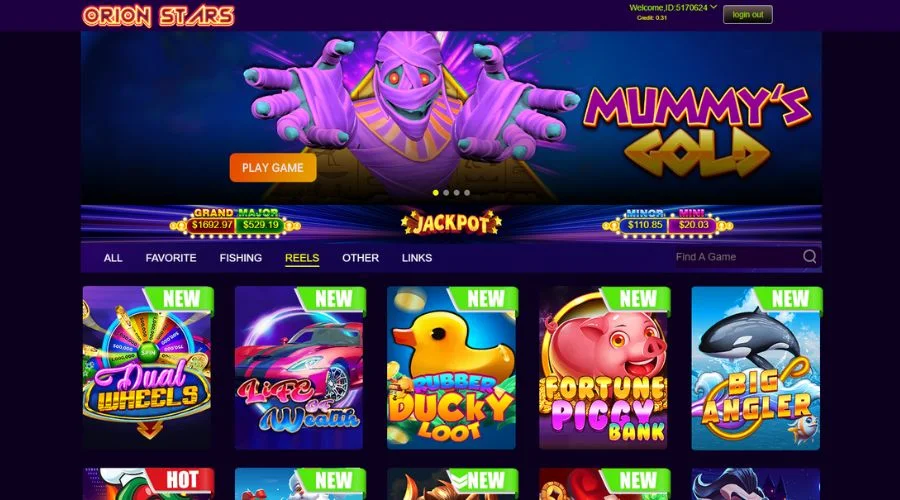
Orion Stars 777 is a mobile-optimized social gaming platform with fish games and slots. The game lobby is packed with exciting fish tables that offer solo or multiplayer action.
These underwater adventures feature fast-paced gameplay, with weapon upgrades that cost more credits that you can use to take down the largest sea monsters. Notable examples in Orion Stars’ game lobby include Megalodon Strike, Mummy’s Gold, Tiger Strike, and more.
Players who prefer slots can play a variety of old-school and modern online slots. Ducky Looy, Life of Wealth, Classic 777, and Lamp of Aladdin are the most popular slot games. Their easy learning curve, thematic variety, and distinct game features set them apart from other game types.
Click on the Other Games tab, and you get a collection of bingo, keno, roulette, and crash games. They offer an alternative to fish tables and slots, for a truly different type of gaming at Orion Stars 777.
FAQ
Is the Orion Stars 777 APK safe?
Yes, Orion Stars 777 is safe to download as long as you get it from an official source such as VegasGems. To stay on the safe side, avoid third-party mirror sites, and especially those that promise cracked or modded versions, as they may hide malware.
Is Orion Stars 777 legit?
Yes, Orion Stars 777 is a legit social gaming platform. It’s not a state-licensed casino, though. You get to play for fun with redeemable rewards, and all play is done with virtual credits.
Does Orion Stars 777 work on iPhone?
The APK file provided in this guide is built exclusively for Android devices. It won’t run on iOS devices. iPhone players need a completely different setup process to access Orion Stars and play its games. This will be covered in a future dedicated iOS guide.
How do I add credits to my account?
You can add credits to your Orion Stars account via VegasGems. Go to the deposit page, select Orion Stars, and make a deposit of $5 or higher. The funds will be converted to playable credits on Orion Stars.
Categories