Cash Machine 777 APK Download for Android: Safe Installation Guide
Jeffrey Danielson

Content table
Cash Machine 777 is a social gaming platform reachable through VegasGems. It has an Android app that installs through an APK file rather than the Play Store. Before you proceed with a download, you should ensure you get the app from a verified source. This guide covers the security checklist, device requirements, and provides a safe install walkthrough as well.
Before You Download: Safety Checklist
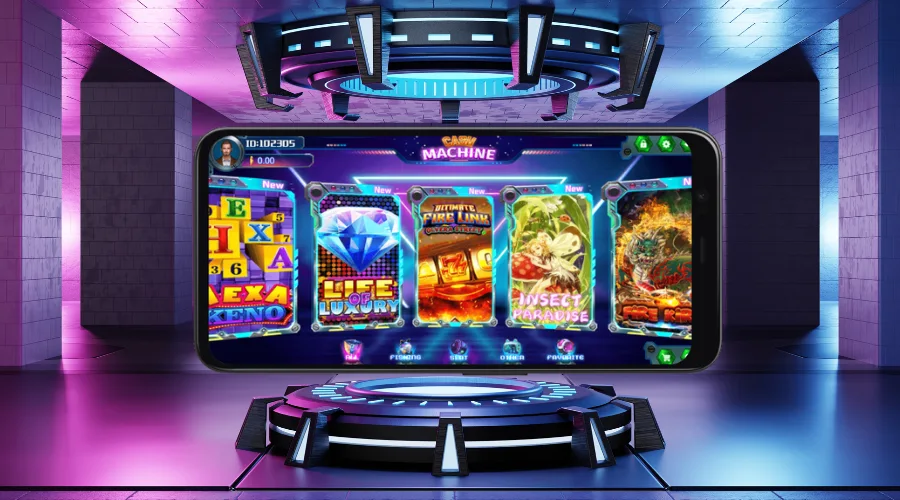
Downloading the Cash Machine Android app is an easy process, but you need to ensure you’re getting it from an official source. Registration and a deposit on VegasGems will provide your username and password, as well as a trusted link that you can use to download the app and enter the platform.
The integrity of the file depends entirely on where it’s downloaded from. The app itself is distributed as an APK, not through Google Play. Google Play’s store policies prohibit apps with prize redemption features, which is why Cash Machine 777 is distributed as an APK rather than the Play Store. Android may still flag sideloaded apps during installation, but this is standard behavior for apps installed outside the Play Store, and is not a warning for this specific app.
App Permissions and Storage Access
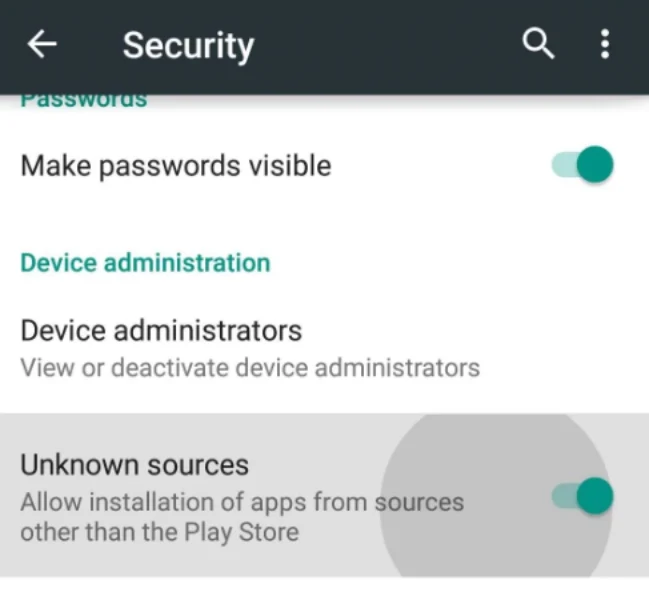
- Since it’s an APK file, you will need to enable installations from unknown sources on your Android device.
- The Cash Machine app requires storage access, network access (to connect to game servers), and notification access (for bonus and perk alerts). Permissions beyond that suggest a modified or unverified build.
- The file size varies between 90 and 120 MB. Game assets need an additional 150 MB, so allow 200-300 MB of free space before installation. Anything below or over that number is a tamper signal.
- In terms of RAM, the app requires a 2 GB minimum, with 4 GB recommended.
When playing through the Cash Machine Android app, you should ensure you play responsibly. Set a budget and stick to it, and read VegasGems’ responsible gaming policy for useful material on how to play within your limits.
System Requirements & Supported Devices
The Cash Machine app runs on Android 7.0 devices and up. For 2026, the recommended Android version is 11 to 14. It requires 2 GB-4 GB of RAM and a stable Internet connection so you can run the games. Players who don’t want third-party apps on their devices can skip the download entirely and play from their browser. Select Web on the main page rather than App for full browser play with no games missing.
As for supported devices, you can play it on any Android smartphone or tablet. The app will scale to any screen size, so whether you use an Android with a compact screen or a larger one such as the Samsung S26 Ultra, it will load fine and play smoothly.
Step-by-Step: Install on Android
Follow the steps below to download the Cash Machine 777 app on your device:
- Enable installation from unknown sources first. For Android 8.0+ go to settings, apps, browser, and toggle the install unknown apps button. For Android 7.0 go to settings, security, then unknown sources.
- Tap the Android APK download button on the main Cash Machine page.

- The file will now be downloaded to your device, with a file size between 90-120 MB.
- Locate the file in your downloads folder and tap it.
- Let it install and start playing.

Game assets can add up to 150 MB of storage after installation. For your safety, we recommend turning off the unknown-sources permission again after installation. Don’t forget to claim your VegasGems sign up bonus after signing up at the platform for extra credits on Cash Machine.
Troubleshooting Common Install Problems
For most users, the Cash Machine 777 app will install without any issues. If you run into an error, you’ll be glad to know there’s a simple fix for each.
App Not Installed
For a quick Cash Machine 777 app not installing fix, which usually occurs due to insufficient storage, you should free up extra space on your device. Clear at least 300 MB of space and re-download the Cash Machine app if needed.
Parse Error
Delete the file you just downloaded and start over. Corrupted and incomplete files are the main cause of the parse error message.
Blocked or Canceled Installation
Allow the installation of the app from your device, then re-enable protection once complete. Some apps and browsers may block or cancel sideloaded APKs by default.
App Crashes
Clear the app’s cache on your device to solve this issue. Relaunch if needed. If crashes after installation or updates persist, uninstall the app and start over.
Updating to the Latest Version
APK files don’t auto-update. The Cash Machine 777 app is not on the Google Play Store, so you need to download the latest updates from the site and install them for a smooth experience. Check the version of your app under Menu -> About -> App Info. Compare the version against the official page, and install the new APK over the old one. New releases share the same certificate, so your account data will remain safe.
The latest version of the app usually irons out bugs and offers a better experience. If you experience app crashes or other Cash Machine login issues, you should refer to the fixes above. If a new update is buggy, wait for the team to push a fresh one, which usually happens fast in case of errors.
What You Can Play on Cash Machine 777

Cash Machine is a fish-and-slots app that offers a solid variety of games that suit all types of players. Fishing table fans can play the iconic Haidilao, Insect Paradise, or Fire Kirin.
For slot game fans, the category lists many hits, including Arizona Heist Hold & Win, Wolf Run, Stinkin’ Rich, and Panda Fortune. All the games in the Cash Machine 777 app are organized in tabs, so you get easy access to each one.
Play Responsibly
Cash Machine is a social gaming platform designed for entertainment only. Players should set personal play limits and stick to them. Start small, don’t chase losses, and play with a clear head to prevent going over your budget. The platform accepts players over 21 and offers helpful advice on responsible play via a link in the footer.
FAQ
Why won't my Cash Machine 777 APK install on my Android device?
The Cash Machine 777 APK may not install on your Android device for several reasons. These include insufficient storage, not enabling installation from unknown sources, a blocked or canceled app installation, or an app crash during installation.
What is different about the latest version?
App updates deliver bug fixes and performance improvements, especially for newer Android hardware. New games may also appear as they’re added to the platform. Older builds may run into compatibility issues, so it’s worth comparing your app version against the official page every month or so.
Can I get Cash Machine 777 from APKPure or similar sites?
No, you must not get the Cash Machine 777 app from APKPure or similar sites. These aggregator sites may have modified and unsafe apps. Get your logins through VegasGems for a verified link to the platform.
Do I need to uninstall the old version before updating?
No, you can download the latest update and install over the older version. Releases share the same certificate, so your data will be stored.
Does Cash Machine 777 APK work on Android tablets?
Yes, the Cash Machine 777 APK works on a range of Android devices, including tablets. You can download it on your tablet in the same way you do on your smartphone.
Does Cash Machine 777 work on iPhone?
The Cash Machine app is currently only available on Android devices. There’s no iOS app, but iPhone users can land on the mobile site and play the games.
Categories